---
title: Use Subscriptions As a Learner
description: To use subscriptions as a learner on Open edX LMS (Learning Management System), you typically need to follow the course enrollment and payment process for courses that offer subscription-based access.
---
[Skip to content](https://help.edly.io/docs/use-subscriptions-as-a-learner-0#main-content)
English
Show submenu for translations
-1.png?width=100&height=75&name=Edly%20by%20Arbisoft%20(Red%20and%20Gray)-1.png)
Open main navigation
Close main navigation
- English
Show submenu for translations
- Visit edly.io
Visit edly.io
Hello. How can we help you?
- There are no suggestions because the search field is empty.
1. [Edly Knowledge Base](https://help.edly.io/docs?hsLang=en)
2. [Learner Experience](https://help.edly.io/docs/learner-experience?hsLang=en)
3. [Discovery Site](https://help.edly.io/docs/learner-experience?hsLang=en#discovery-site)
# Use Subscriptions As a Learner
To use subscriptions as a learner on Open edX LMS (Learning Management System), you typically need to follow the course enrollment and payment process for courses that offer subscription-based access.
### How to buy a subscription?
#### Step 1:
- Navigate to the discovery/marketing site.
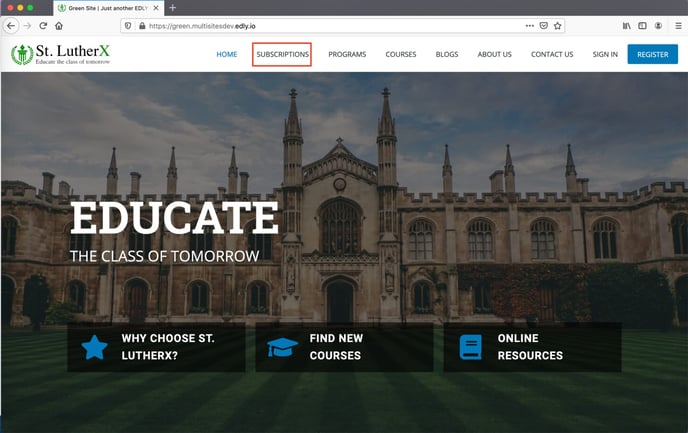
#### Step 2:
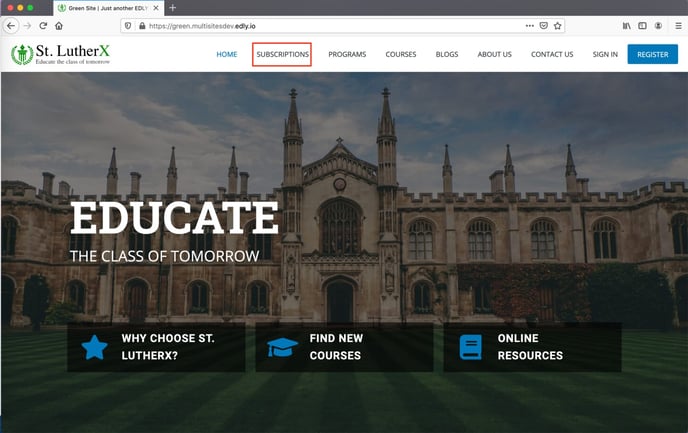
- Then navigate to the **Subscriptions** listing page.
#### Step 3:
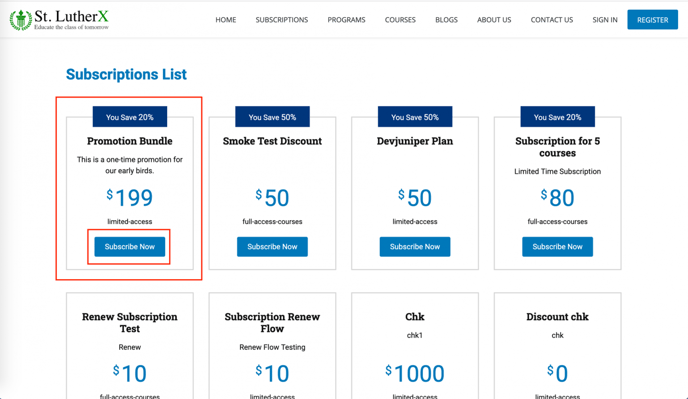
- Select the desired subscription by clicking on the **Subscribe Now** button.
#### Step 4:
- You will be redirected to the basket page to fill in the details.
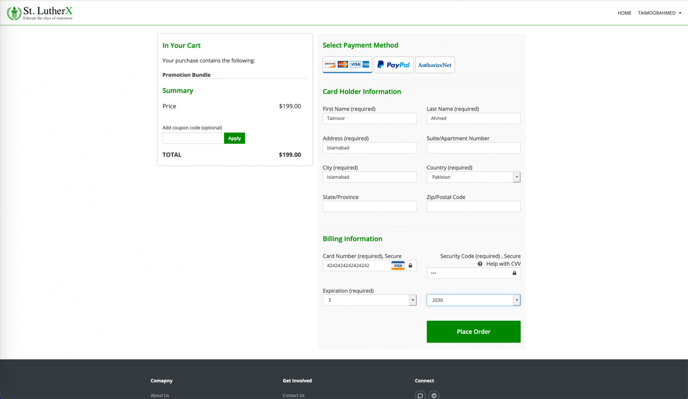
You would need to sign in if you are not signed in already.
Click on the **Place Order** button to buy the subscription.
#### Step 5:
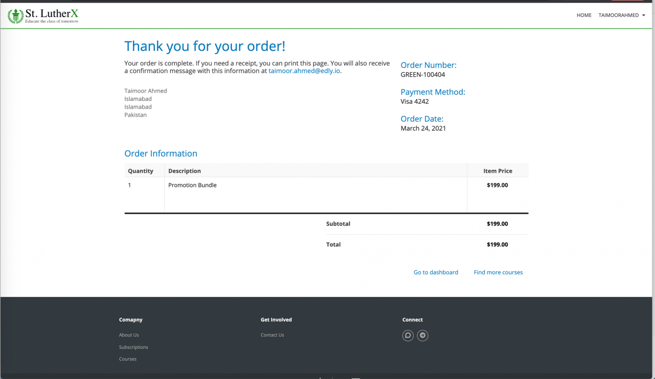
- On successful purchase, you will be shown the order summary for your purchase.
#### Step 6:
- Now navigate back to the discovery/marketing site. Here you’ll see the **Subscribed** page instead of **Subscriptions**.
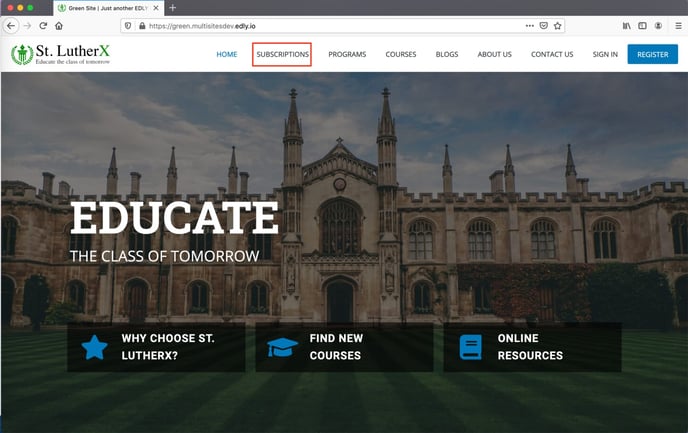
Click on **Subscribed** to view your purchased subscription.
#### Step 7:
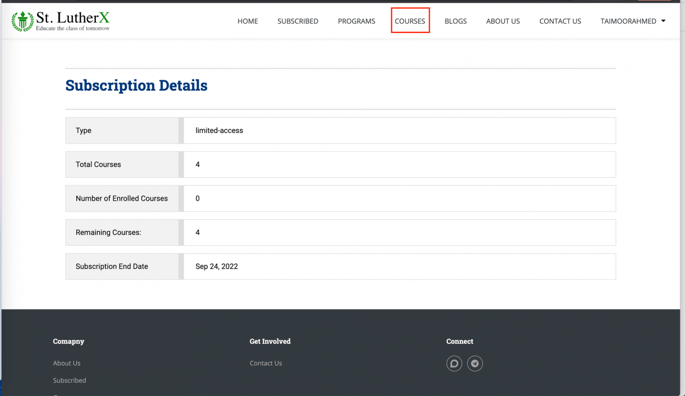
- Here, you can see your subscription details.
#### Step 8:
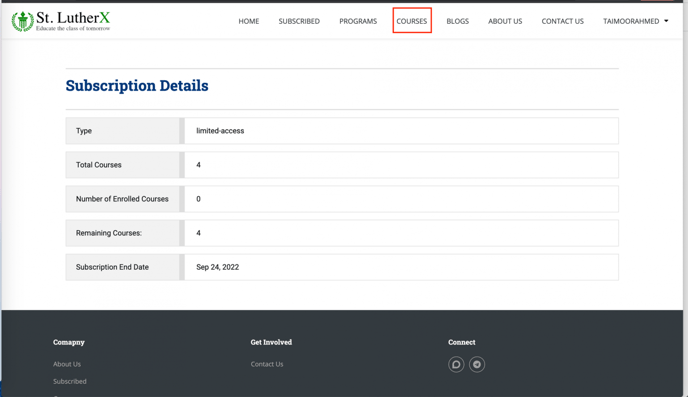
- You can now navigate to the **Courses** page to purchase a course with a subscription.
#### Step 9:
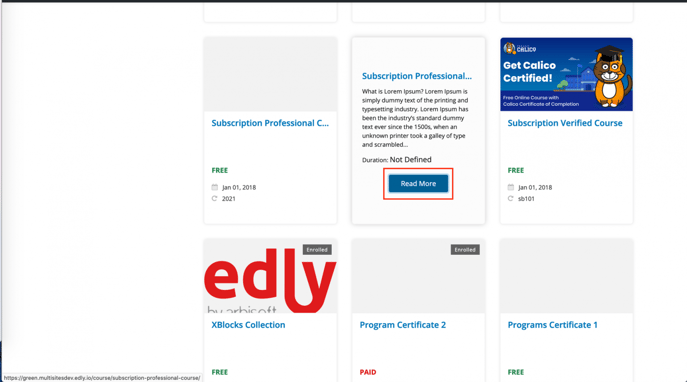
- Hover the cursor on the desired course card and click on the **Read More** button.
#### Step 10:
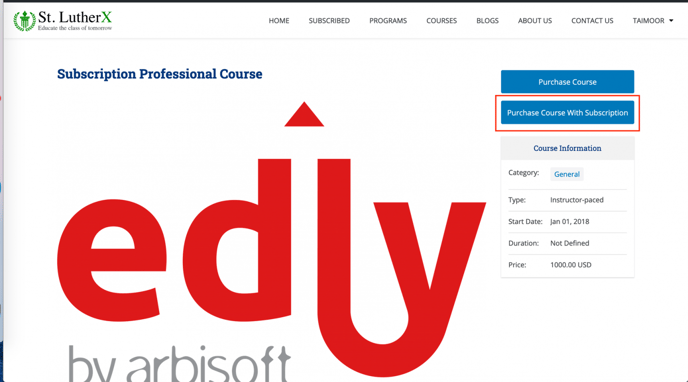
- On the course detail page, you have the option to either **Purchase Courses** or **Purchase courses with a subscription**. Click on **Purchase course with a subscription**.
#### Step 11:
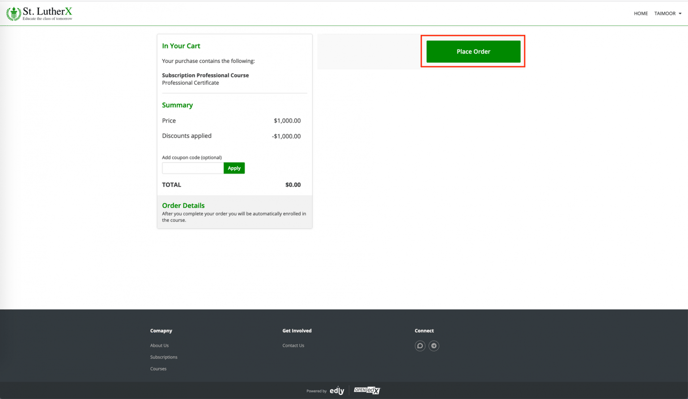
- Click on the **Place Order** button to purchase the course with a subscription.
#### Step 12:
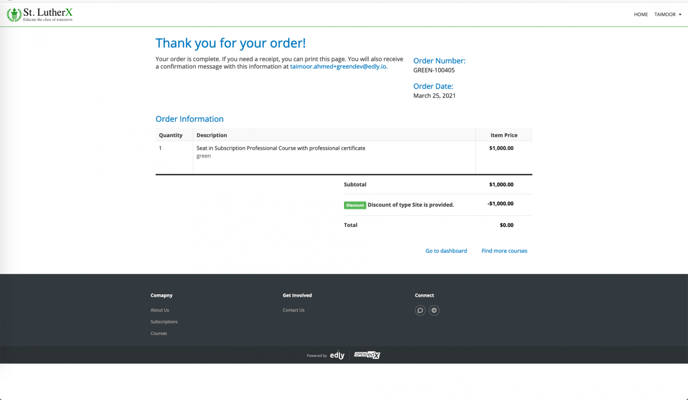
- After successfully placing the order, you’ll be redirected to the order summary page.
#### Step 13:
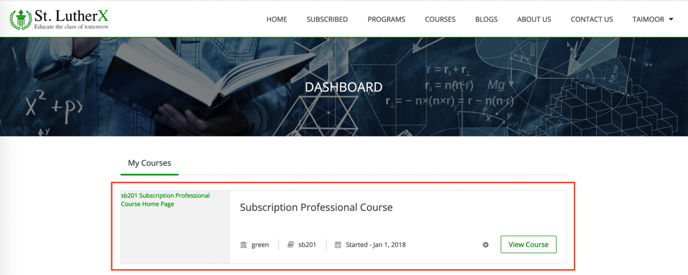
- You can click on **Go to Dashboard** to navigate to LMS and view the purchased course.
- [Discovery Site](https://help.edly.io/docs/discovery-site?hsLang=en#main-content)
- [Settings and Tools](https://help.edly.io/docs/discovery-site?hsLang=en#settings-and-tools)
- [Assets Management](https://help.edly.io/docs/discovery-site?hsLang=en#assets-management)
- [Edly Panel](https://help.edly.io/docs/edly-panel?hsLang=en#main-content)
- [Settings and Tools](https://help.edly.io/docs/edly-panel?hsLang=en#settings-and-tools)
- [User Management](https://help.edly.io/docs/edly-panel?hsLang=en#user-management)
- [Panel Insights](https://help.edly.io/docs/edly-panel?hsLang=en#panel-insights)
- [Panel Dashboard](https://help.edly.io/docs/edly-panel?hsLang=en#panel-dashboard)
- [Themes](https://help.edly.io/docs/edly-panel?hsLang=en#themes)
- [Studio](https://help.edly.io/docs/studio?hsLang=en#main-content)
- [Studio Guides](https://help.edly.io/docs/studio?hsLang=en#studio-guides)
- [Creating a Course](https://help.edly.io/docs/studio?hsLang=en#creating-a-course)
- [Exercises and Tools](https://help.edly.io/docs/studio?hsLang=en#exercises-and-tools)
- [Course Components](https://help.edly.io/docs/studio?hsLang=en#course-components)
- [Course Assets](https://help.edly.io/docs/studio?hsLang=en#course-assets)
- [Re-running Your Course](https://help.edly.io/docs/studio?hsLang=en#re-running-your-course)
- [LMS Administration](https://help.edly.io/docs/lms-administration?hsLang=en#main-content)
- [User Management](https://help.edly.io/docs/lms-administration?hsLang=en#user-management)
- [Open edX E-commerce](https://help.edly.io/docs/lms-administration?hsLang=en#open-edx-e-commerce)
- [Instructor Dashboard](https://help.edly.io/docs/lms-administration?hsLang=en#instructor-dashboard)
- [Learner Experience](https://help.edly.io/docs/learner-experience?hsLang=en#main-content)
- [Learning Management System](https://help.edly.io/docs/learner-experience?hsLang=en#learning-management-system)
- [Discovery Site](https://help.edly.io/docs/learner-experience?hsLang=en#discovery-site)
- [Getting Started](https://help.edly.io/docs/getting-started?hsLang=en#main-content)
- [Open edX E-commerce](https://help.edly.io/docs/getting-started?hsLang=en#open-edx-e-commerce)
- [Learning Management System](https://help.edly.io/docs/getting-started?hsLang=en#learning-management-system)
- [Exercises and Tools](https://help.edly.io/docs/getting-started?hsLang=en#exercises-and-tools)
- [Discovery Site](https://help.edly.io/docs/getting-started?hsLang=en#discovery-site)
- [Edly Panel Management](https://help.edly.io/docs/getting-started?hsLang=en#edly-panel-management)
- [General](https://help.edly.io/docs/general?hsLang=en)
[-2.png?width=34&height=24&name=Edly%20by%20Arbisoft%20(Red%20and%20Gray)-2.png "Chill listening crop-3")](http://arbisoft.com)
[mailto:email@email.com](mailto:email@email.com)
Copyright © 2026, Edly Inc.