---
title: How to Use Bulk Registration Feature in Edly Panel?
description: You can add users to your Edly site by using the bulk registration feature. This feature has been added to reduce the effort of the registration process. Edly introduced bulk registration feature in E
---
[Skip to content](https://help.edly.io/docs/how-to-use-bulk-registration-feature-in-edly-panel-0#main-content)
English
Show submenu for translations
-1.png?width=100&height=75&name=Edly%20by%20Arbisoft%20(Red%20and%20Gray)-1.png)
Open main navigation
Close main navigation
- English
Show submenu for translations
- Visit edly.io
Visit edly.io
Hello. How can we help you?
- There are no suggestions because the search field is empty.
1. [Edly Knowledge Base](https://help.edly.io/docs?hsLang=en)
2. [Edly Panel](https://help.edly.io/docs/edly-panel?hsLang=en)
3. [User Management](https://help.edly.io/docs/edly-panel?hsLang=en#user-management)
# How to Use Bulk Registration Feature in Edly Panel?
## Add and Register Multiple Users at Once Using the Bulk Upload Feature
### Overview
The **Bulk Registration** feature in the Edly Panel allows administrators to register multiple users at once by importing a CSV file, saving significant time compared to adding users one by one. To use Bulk Registration, download the sample CSV file from the Edly Panel, fill in the required user details, upload the completed file, and click **Continue**. Once processed, you will receive a confirmation email with an attached CSV showing the registration status of each user. This guide walks you through each step so you can onboard large groups of users quickly and accurately.
**Tip:** Make sure you have logged in to the Edly Panel before proceeding with the article.
- Go to the Edly panel
- Open the **Users** page from the left side menu.
- Click on the **Add bulk users** button.
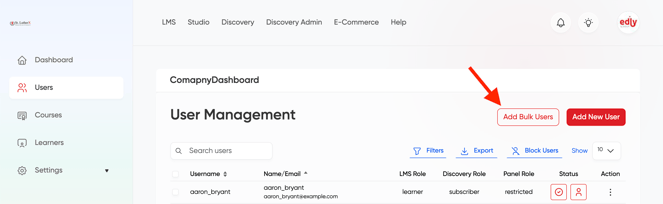
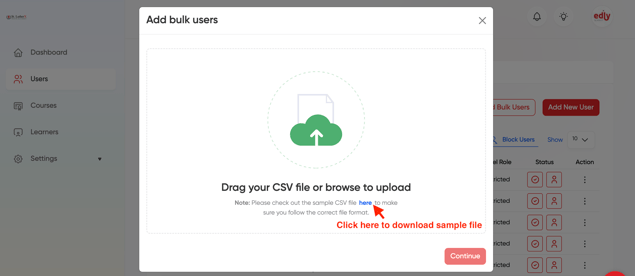
- After clicking on the **Add bulk users** button, you will see a pop-up.
- In this pop-up, click **Download Sample CSV** to download a sample CSV file that includes all the columns and fields required by your site's configuration.
- The sample CSV file includes all columns and fields enabled in your site’s configuration, as shown below.
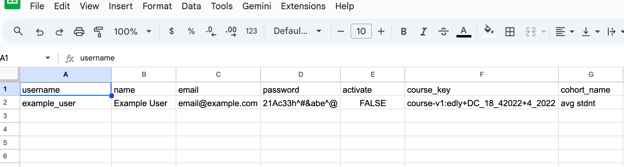
- Open the downloaded CSV file and replace the placeholder values with valid user data for each required field. Once your edits are complete, upload the file by dragging and dropping it onto the upload area, or by clicking the upload icon and selecting the file from your device.
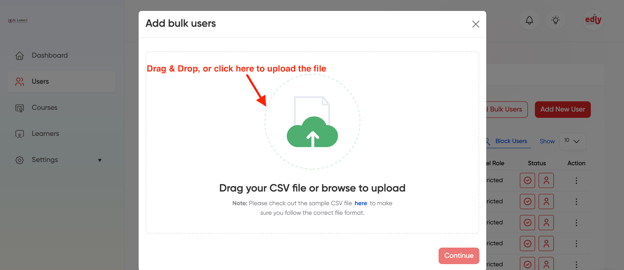
- After uploading this file you will see that the **Continue** button is enabled.
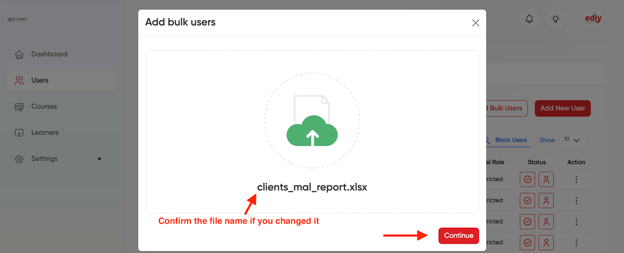
- Click on **Continue** button in order to proceed further.
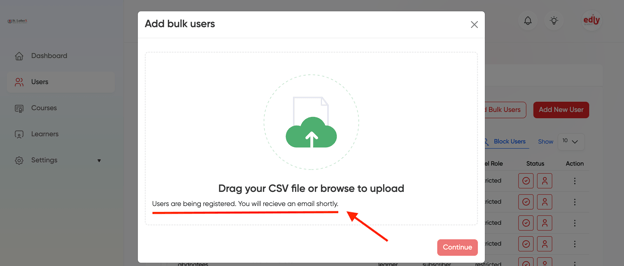
- You will receive a success message and an email will also sent to you to confirm the registration status.
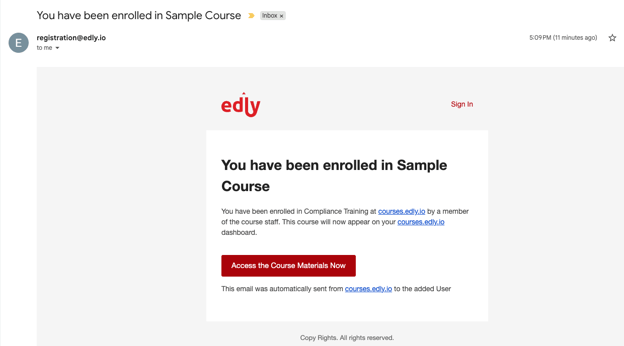
- If the uploaded CSV has valid data then new users will also receive activation account emails.
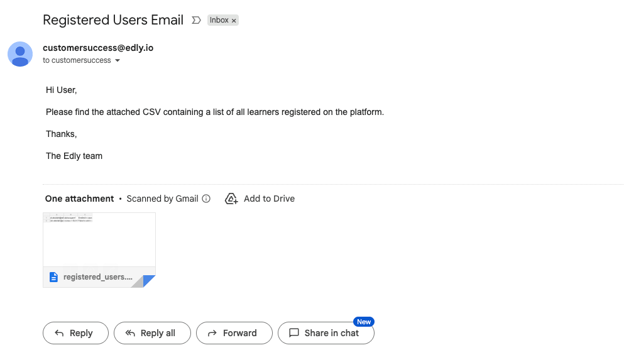
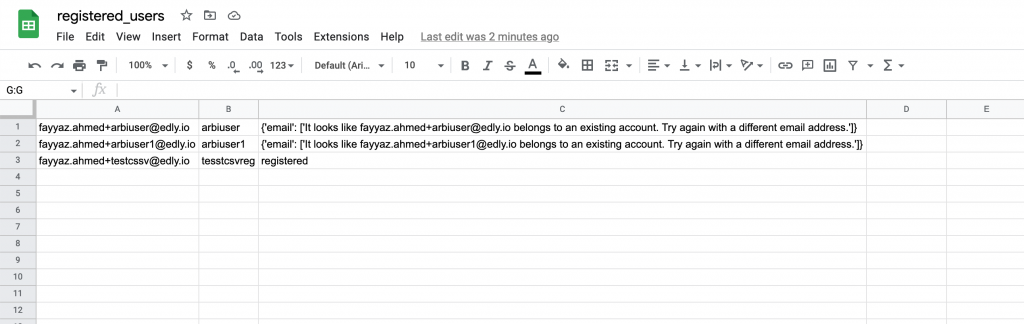
- The email includes an attached CSV file showing the registration status of each user — whether they were successfully added or not.
- [Discovery Site](https://help.edly.io/docs/discovery-site?hsLang=en#main-content)
- [Settings and Tools](https://help.edly.io/docs/discovery-site?hsLang=en#settings-and-tools)
- [Assets Management](https://help.edly.io/docs/discovery-site?hsLang=en#assets-management)
- [Edly Panel](https://help.edly.io/docs/edly-panel?hsLang=en#main-content)
- [Settings and Tools](https://help.edly.io/docs/edly-panel?hsLang=en#settings-and-tools)
- [User Management](https://help.edly.io/docs/edly-panel?hsLang=en#user-management)
- [Panel Insights](https://help.edly.io/docs/edly-panel?hsLang=en#panel-insights)
- [Panel Dashboard](https://help.edly.io/docs/edly-panel?hsLang=en#panel-dashboard)
- [Themes](https://help.edly.io/docs/edly-panel?hsLang=en#themes)
- [Studio](https://help.edly.io/docs/studio?hsLang=en#main-content)
- [Studio Guides](https://help.edly.io/docs/studio?hsLang=en#studio-guides)
- [Creating a Course](https://help.edly.io/docs/studio?hsLang=en#creating-a-course)
- [Exercises and Tools](https://help.edly.io/docs/studio?hsLang=en#exercises-and-tools)
- [Course Components](https://help.edly.io/docs/studio?hsLang=en#course-components)
- [Course Assets](https://help.edly.io/docs/studio?hsLang=en#course-assets)
- [Re-running Your Course](https://help.edly.io/docs/studio?hsLang=en#re-running-your-course)
- [LMS Administration](https://help.edly.io/docs/lms-administration?hsLang=en#main-content)
- [User Management](https://help.edly.io/docs/lms-administration?hsLang=en#user-management)
- [Open edX E-commerce](https://help.edly.io/docs/lms-administration?hsLang=en#open-edx-e-commerce)
- [Instructor Dashboard](https://help.edly.io/docs/lms-administration?hsLang=en#instructor-dashboard)
- [Learner Experience](https://help.edly.io/docs/learner-experience?hsLang=en#main-content)
- [Learning Management System](https://help.edly.io/docs/learner-experience?hsLang=en#learning-management-system)
- [Discovery Site](https://help.edly.io/docs/learner-experience?hsLang=en#discovery-site)
- [Getting Started](https://help.edly.io/docs/getting-started?hsLang=en#main-content)
- [Open edX E-commerce](https://help.edly.io/docs/getting-started?hsLang=en#open-edx-e-commerce)
- [Learning Management System](https://help.edly.io/docs/getting-started?hsLang=en#learning-management-system)
- [Exercises and Tools](https://help.edly.io/docs/getting-started?hsLang=en#exercises-and-tools)
- [Discovery Site](https://help.edly.io/docs/getting-started?hsLang=en#discovery-site)
- [Edly Panel Management](https://help.edly.io/docs/getting-started?hsLang=en#edly-panel-management)
- [General](https://help.edly.io/docs/general?hsLang=en)
[-2.png?width=34&height=24&name=Edly%20by%20Arbisoft%20(Red%20and%20Gray)-2.png "Chill listening crop-3")](http://arbisoft.com)
[mailto:email@email.com](mailto:email@email.com)
Copyright © 2026, Edly Inc.