---
title: How to Discover Courses as a Learner?
description: In today's digital age, Learning Management Systems (LMS) have revolutionized the way we acquire knowledge and skills. As a learner, navigating the vast array of courses available on an LMS can be overwhelming.
---
[Skip to content](https://help.edly.io/docs/how-to-discover-courses-as-a-learner-0#main-content)
English
Show submenu for translations
-1.png?width=100&height=75&name=Edly%20by%20Arbisoft%20(Red%20and%20Gray)-1.png)
Open main navigation
Close main navigation
- English
Show submenu for translations
- Visit edly.io
Visit edly.io
Hello. How can we help you?
- There are no suggestions because the search field is empty.
1. [Edly Knowledge Base](https://help.edly.io/docs?hsLang=en)
2. [Learner Experience](https://help.edly.io/docs/learner-experience?hsLang=en)
3. [Discovery Site](https://help.edly.io/docs/learner-experience?hsLang=en#discovery-site)
# How to Discover Courses as a Learner?
As a learner on the Edly platform, discovering the right courses is the first step in your learning journey. Edly’s Learning Management System offers several intuitive ways to browse, search, and explore available courses. This guide explains how you can discover courses and start learning with ease.
This article provides a step-by-step guide on how to effectively discover courses that align with your learning goals and preferences.
**Hint:** You can browse available courses without logging in. However, to enroll in a course, you must be logged in to your Edly account.
Go to the Discovery Site, where you will find courses.
### Searching for a Course
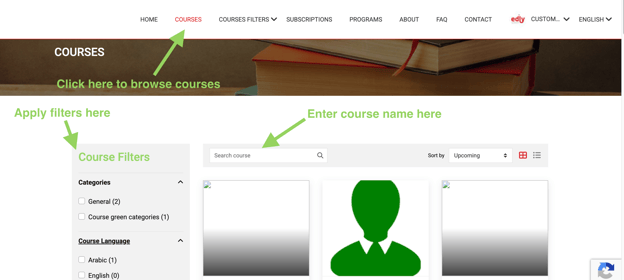
- Go to the **Courses** page. Here you see two options: filter courses by **text** or filter courses by **category**
- The search **Course** field allows searching for any course by title or keyword available in the course description
- Course **Filter** allows filtering the courses based on categories.
### Enrolling in a Course
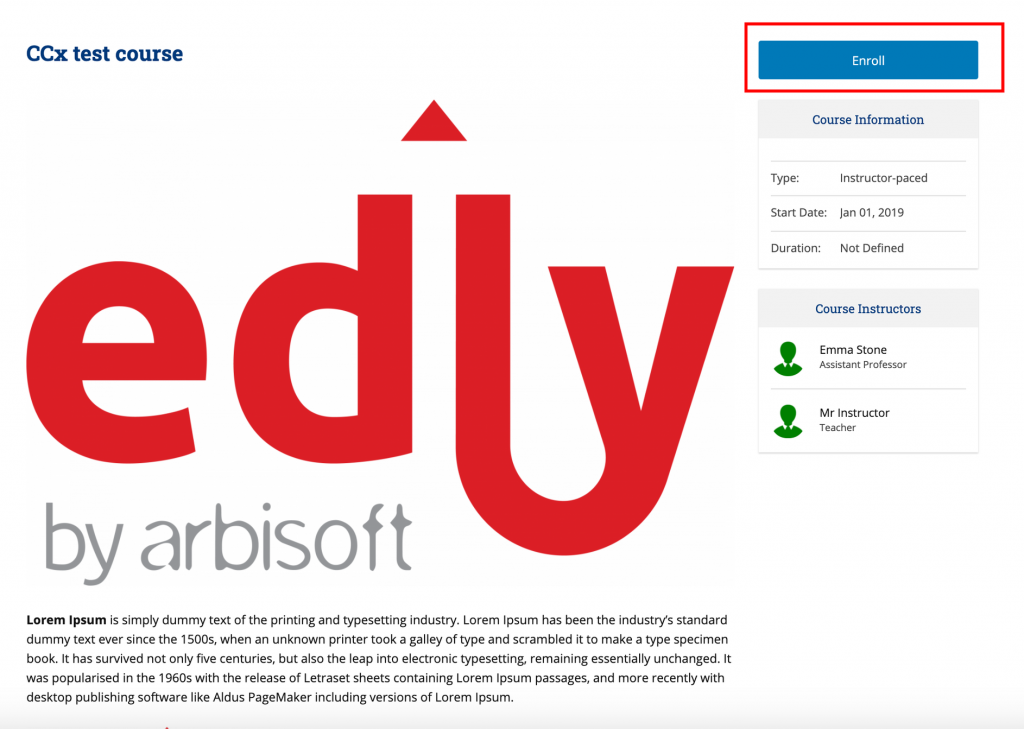
- Click on any one of the Courses.
- Once the course detail page is open. Click on the **Enroll** Button.
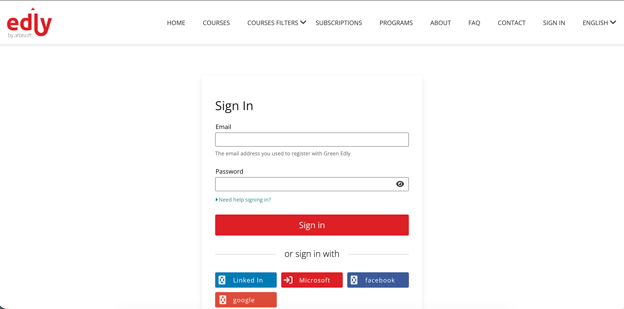
- This will take you to the login screen. If you are new, then click on Create an Account to create your account; else, log in with your credentials.
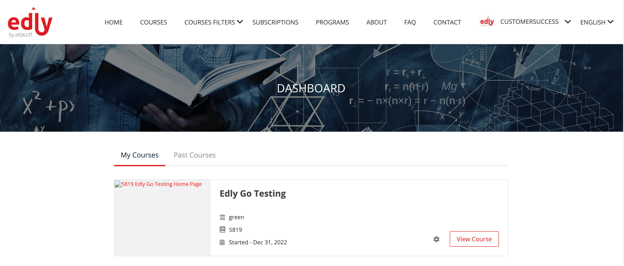
- Once you have successfully logged in, you will be enrolled in the course, and it will take you to the Dashboard page, where you can see all courses in which the user is registered.
### View all Enrolled Courses
- Log in to the site and then click on the **Dashboard**.
- On the **dashboard** page, you will see all the courses in which you are enrolled.
- [Discovery Site](https://help.edly.io/docs/discovery-site?hsLang=en#main-content)
- [Settings and Tools](https://help.edly.io/docs/discovery-site?hsLang=en#settings-and-tools)
- [Assets Management](https://help.edly.io/docs/discovery-site?hsLang=en#assets-management)
- [Edly Panel](https://help.edly.io/docs/edly-panel?hsLang=en#main-content)
- [Settings and Tools](https://help.edly.io/docs/edly-panel?hsLang=en#settings-and-tools)
- [User Management](https://help.edly.io/docs/edly-panel?hsLang=en#user-management)
- [Panel Insights](https://help.edly.io/docs/edly-panel?hsLang=en#panel-insights)
- [Panel Dashboard](https://help.edly.io/docs/edly-panel?hsLang=en#panel-dashboard)
- [Themes](https://help.edly.io/docs/edly-panel?hsLang=en#themes)
- [Studio](https://help.edly.io/docs/studio?hsLang=en#main-content)
- [Studio Guides](https://help.edly.io/docs/studio?hsLang=en#studio-guides)
- [Creating a Course](https://help.edly.io/docs/studio?hsLang=en#creating-a-course)
- [Exercises and Tools](https://help.edly.io/docs/studio?hsLang=en#exercises-and-tools)
- [Course Components](https://help.edly.io/docs/studio?hsLang=en#course-components)
- [Course Assets](https://help.edly.io/docs/studio?hsLang=en#course-assets)
- [Re-running Your Course](https://help.edly.io/docs/studio?hsLang=en#re-running-your-course)
- [LMS Administration](https://help.edly.io/docs/lms-administration?hsLang=en#main-content)
- [User Management](https://help.edly.io/docs/lms-administration?hsLang=en#user-management)
- [Open edX E-commerce](https://help.edly.io/docs/lms-administration?hsLang=en#open-edx-e-commerce)
- [Instructor Dashboard](https://help.edly.io/docs/lms-administration?hsLang=en#instructor-dashboard)
- [Learner Experience](https://help.edly.io/docs/learner-experience?hsLang=en#main-content)
- [Learning Management System](https://help.edly.io/docs/learner-experience?hsLang=en#learning-management-system)
- [Discovery Site](https://help.edly.io/docs/learner-experience?hsLang=en#discovery-site)
- [Getting Started](https://help.edly.io/docs/getting-started?hsLang=en#main-content)
- [Open edX E-commerce](https://help.edly.io/docs/getting-started?hsLang=en#open-edx-e-commerce)
- [Learning Management System](https://help.edly.io/docs/getting-started?hsLang=en#learning-management-system)
- [Exercises and Tools](https://help.edly.io/docs/getting-started?hsLang=en#exercises-and-tools)
- [Discovery Site](https://help.edly.io/docs/getting-started?hsLang=en#discovery-site)
- [Edly Panel Management](https://help.edly.io/docs/getting-started?hsLang=en#edly-panel-management)
- [General](https://help.edly.io/docs/general?hsLang=en)
[-2.png?width=34&height=24&name=Edly%20by%20Arbisoft%20(Red%20and%20Gray)-2.png "Chill listening crop-3")](http://arbisoft.com)
[mailto:email@email.com](mailto:email@email.com)
Copyright © 2026, Edly Inc.