---
title: How to Add Users For Different Roles in Edly Panel?
description: As an administrator of the Edly platform, you can set up different user roles depending upon the level of access they require to manage learner and user experience on your Edly instance. This document
---
[Skip to content](https://help.edly.io/docs/how-to-add-users-for-different-roles-in-edly-panel-0#main-content)
English
Show submenu for translations
-1.png?width=100&height=75&name=Edly%20by%20Arbisoft%20(Red%20and%20Gray)-1.png)
Open main navigation
Close main navigation
- English
Show submenu for translations
- Visit edly.io
Visit edly.io
Hello. How can we help you?
- There are no suggestions because the search field is empty.
1. [Edly Knowledge Base](https://help.edly.io/docs?hsLang=en)
2. [Edly Panel](https://help.edly.io/docs/edly-panel?hsLang=en)
3. [User Management](https://help.edly.io/docs/edly-panel?hsLang=en#user-management)
# How to Add Users For Different Roles in Edly Panel?
## Configure and Assign User Roles in the Edly Panel
### Overview
As an administrator of the Edly platform, you can set up different user roles depending on the level of access they require to manage learner and user experience on your Edly instance. This document gives an overview of the different user roles in the Edly Panel.
**Tip:** Make sure you have logged in to the Edly Panel before proceeding with the article.
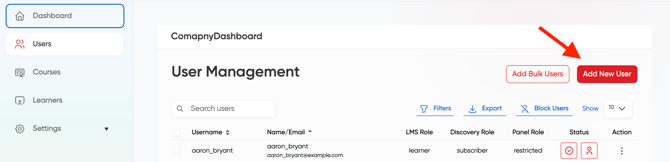
After logging in to your instance, go to the **Users** management tab and click on **Add new user**.
### Edly Panel Roles
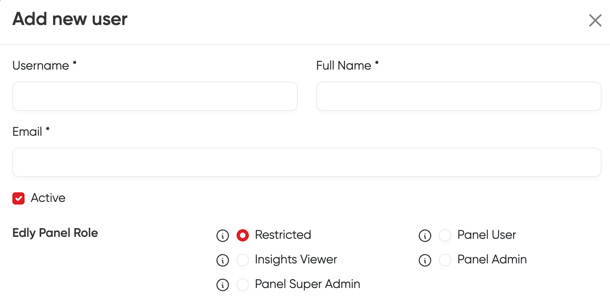
You can define user roles based on the level of access they require. Let's explore the different levels of Edly Panel user roles.
- **Restricted:** This user can’t access Edly Panel.
- **Panel Viewer**
- View insights
- Can manage their own profile
- **Insights Viewer:** This user can do the following things:
- Access Edly Panel
- View Edly Panel Insights
- View Quick Stats
- Can manage own account settings.
- **Panel Admin:** This user can access all the features of Edly Panel, including:
- Accessing the Edly panel
- Viewing quick stats
- Managing other users
- Changing themes
- Viewing Edly panel Insights
- Managing own account settings
- **Panel Super Admin:** This user can access all the features of Edly Panel, including:
- Viewing billing and plans
- Adding/Viewing payment method
- Viewing invoice history
- Accessing the Edly panel
- Managing own/super admin account settings
- Changing themes
- Accessing the Edly panel
- Viewing quick stats
### Discovery Roles
Discovery Admin provides access to the WordPress Dashboard that can be used to publish courses, edit pages, and perform many other tasks. Let's take a look at the different Discovery Roles.
- **Subscriber:** The user can only comment on the blogs. This user can’t edit anything on the marketing site.
- **Edly Admin:** This user can manage everything on the marketing site including:
- Add and edit pages
- Add and edit courses
- Add and edit instructors
- Add and edit programs
- Approve or disapprove other user comments
- Edit header menu
- Edit footer content
- Enable or disable Maintenance Mode

### LMS and Studio Roles
Edly Panel administrators can add or update different user roles for the LMS as well. Let's explore the different levels of access a user can have on the LMS.
- **Learner:** This user can only take a course and can’t do the following things:
- Can’t create a course
- Can’t create a library
- Can’t edit any other course
- Doesn’t have Studio access
- **Course Creator:** This user can do the following things:
- Can create a course
- Create a library
- View and edit all courses created by him.
- View and edit courses created by other users if they are a part of the course team
- **Staff:** This user can do the following things:
- Create a course
- Create a library
- View, edit, archive, and publish all courses on the current site, even if he or she is not a part of the course team.
- Add and remove team members to a course team
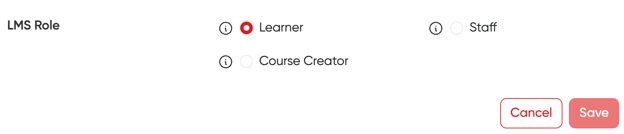
Once you set the preferences of the user you're adding, please click on the "Save" button, and then the user will be added.
- [Discovery Site](https://help.edly.io/docs/discovery-site?hsLang=en#main-content)
- [Settings and Tools](https://help.edly.io/docs/discovery-site?hsLang=en#settings-and-tools)
- [Assets Management](https://help.edly.io/docs/discovery-site?hsLang=en#assets-management)
- [Edly Panel](https://help.edly.io/docs/edly-panel?hsLang=en#main-content)
- [Settings and Tools](https://help.edly.io/docs/edly-panel?hsLang=en#settings-and-tools)
- [User Management](https://help.edly.io/docs/edly-panel?hsLang=en#user-management)
- [Panel Insights](https://help.edly.io/docs/edly-panel?hsLang=en#panel-insights)
- [Panel Dashboard](https://help.edly.io/docs/edly-panel?hsLang=en#panel-dashboard)
- [Themes](https://help.edly.io/docs/edly-panel?hsLang=en#themes)
- [Studio](https://help.edly.io/docs/studio?hsLang=en#main-content)
- [Studio Guides](https://help.edly.io/docs/studio?hsLang=en#studio-guides)
- [Creating a Course](https://help.edly.io/docs/studio?hsLang=en#creating-a-course)
- [Exercises and Tools](https://help.edly.io/docs/studio?hsLang=en#exercises-and-tools)
- [Course Components](https://help.edly.io/docs/studio?hsLang=en#course-components)
- [Course Assets](https://help.edly.io/docs/studio?hsLang=en#course-assets)
- [Re-running Your Course](https://help.edly.io/docs/studio?hsLang=en#re-running-your-course)
- [LMS Administration](https://help.edly.io/docs/lms-administration?hsLang=en#main-content)
- [User Management](https://help.edly.io/docs/lms-administration?hsLang=en#user-management)
- [Open edX E-commerce](https://help.edly.io/docs/lms-administration?hsLang=en#open-edx-e-commerce)
- [Instructor Dashboard](https://help.edly.io/docs/lms-administration?hsLang=en#instructor-dashboard)
- [Learner Experience](https://help.edly.io/docs/learner-experience?hsLang=en#main-content)
- [Learning Management System](https://help.edly.io/docs/learner-experience?hsLang=en#learning-management-system)
- [Discovery Site](https://help.edly.io/docs/learner-experience?hsLang=en#discovery-site)
- [Getting Started](https://help.edly.io/docs/getting-started?hsLang=en#main-content)
- [Open edX E-commerce](https://help.edly.io/docs/getting-started?hsLang=en#open-edx-e-commerce)
- [Learning Management System](https://help.edly.io/docs/getting-started?hsLang=en#learning-management-system)
- [Exercises and Tools](https://help.edly.io/docs/getting-started?hsLang=en#exercises-and-tools)
- [Discovery Site](https://help.edly.io/docs/getting-started?hsLang=en#discovery-site)
- [Edly Panel Management](https://help.edly.io/docs/getting-started?hsLang=en#edly-panel-management)
- [General](https://help.edly.io/docs/general?hsLang=en)
[-2.png?width=34&height=24&name=Edly%20by%20Arbisoft%20(Red%20and%20Gray)-2.png "Chill listening crop-3")](http://arbisoft.com)
[mailto:email@email.com](mailto:email@email.com)
Copyright © 2026, Edly Inc.